| Number/Name |
Description |
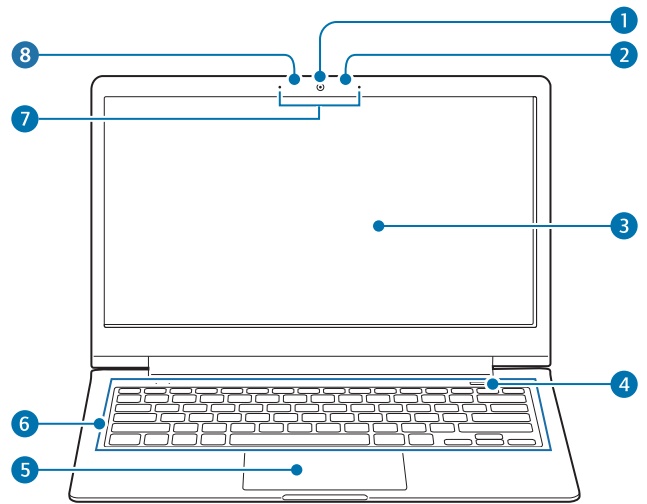
| Camera |
Takes photos or videos. Use the camera application on the Start screen to take photos or videos. |
| Light sensor |
This sensor detects the ambient illumination of the computer. If the ambient illumination becomes dark, the LCD becomes dimmer and the keyboard backlight is lit. On the contrary, if the ambient illumination becomes brighter, the LCD becomes brighter and the keyboard backlight is turned off. Do not cover the sensor. |
| LCD/Touch screen (optional) |
Displays the user interface. Recognizes touches on the screen. (Only for models with the touch screen.) |
| Power button |
Press to turn the computer on. |
| Touchpad |
Move the cursor and click options. Works actions as those of a mouse. |
| Keyboard |
Press keys to enter data. |
| Microphone |
Use the built-in microphone. |
| Camera indicator light |
Indicates the camera status. |